Arguing that powering artificial intelligence (AI) remains the most underappreciated vertical at Reliance Industries (RIL), Morgan Stanley believes it is rapidly emerging as the next major value driver for Mukesh Ambani’s conglomerate, with the potential to reshape the stock’s equity story over the next decade. In a fresh note, Morgan Stanley analysts, including Mayank Maheshwari, say recent comments from RIL’s chairman and policymakers “point to a runway of NAV creation as large as 15% of RIL’s NAV” from the AI infrastructure opportunity alone.
An Australian tech company has raised more funds to go toe-to-toe in international markets and join the race for engineering talent.The post Australian tech company unearthing new capacity on the grid lands $1.1bn valuation after new capital raise appeared first on Renew Economy.
LOS ANGELES — The world's biggest social media companies face several landmark trials this year that seek to hold them responsible for harms to children who use their platforms. Opening statements in one such trial in Los Angeles County Superior Court began on Monday.Instagram's parent company Meta and Google's YouTube face claims that their platforms deliberately addict and harm children. TikTok and Snap, which were originally named in the lawsuit, settled for undisclosed sums.Jurors got their first glimpse into what will be a lengthy trial characterized by dueling narratives from the plaintiffs and the two remaining social media companies named as defendants.Meta lawyer Paul Schmidt spoke of the disagreement within the scientific community over social media addiction, with some believing it doesn’t exist or that addiction is not the most appropriate way to describe heavy social media use.‘Addicting the brains of children’Mark Lanier delivered the opening statement for the plaintiffs first, in a lively display where he said the case is as “easy as ABC,” which he said stands for “addicting the brains of children.” He called Meta and Google “two of the richest corporations in history” that have “engineered addiction in children’s brains.”He presented jurors with a slew of internal emails, documents and studies conducted by Meta and YouTube, as well as YouTube’s parent company, Google. He emphasized the findings of a study Meta conducted called “Project Myst” in which they surveyed 1,000 teens and their parents about their social media use. The two major findings, Lanier said, were that the company knew children who experienced “adverse events” like trauma and stress were particularly vulnerable for addiction; and that parental supervision and controls made little impact.He also showed internal Google documents that likened YouTube to a casino, and internal communication between Meta employees in which one person said Instagram is “like a drug” and that employees are “basically pushers.”At the core of the Los Angeles case is a 20-year-old identified only by the initials “KGM,” whose case could determine how thousands of other, similar lawsuits against social media companies will play out. She and two other plaintiffs have been selected for bellwether trials — essentially test cases for both sides to see how their arguments play out before a jury.Plaintiff grew up on YouTube, InstagramKGM made a brief appearance after a break during Lanier’s statement and she will return to testify later in the trial. Lanier spent time speaking about her childhood, and particularly focused on what her personality was like before she began using social media, saying her mother called her a “creative spark” as a child. She started using YouTube at age 6 and Instagram at age 9, Lanier said. Before she graduated elementary school, she had posted 284 videos on YouTube.The outcome of the trial could have profound effects on the companies' businesses and how they will handle children using their platforms.Lanier said the companies’ lawyers will “try to blame the little girl and her parents for the trap they built,” referencing the plaintiff. She was a minor when she said she became addicted to social media platforms, which she claims had a detrimental impact on her mental health.Lanier said that despite the public position of Meta and YouTube being that they work to protect children and implement safeguards for their use of the platforms, their internal documents show an entirely different position, with explicit references to young children being listed as their target audiences.Lanier also drew comparisons between the social media companies and tobacco firms, citing internal communication between Meta employees who were concerned about the company’s lack of proactive action about the potential harm their platforms can have on children and teens.“For a teenager, social validation is survival,” Lanier said. The defendants “engineered a feature that caters to a minor’s craving for social validation,” he added, speaking about “like” buttons and similar features.Meta pushes backIn his opening statement representing Meta, Schmidt said the core question in the case is whether the platforms were a substantial factor in KGM’s mental health struggles. He spent much of his time going through the plaintiff’s health records, emphasizing that she had experienced many difficult circumstances in her childhood, including emotional abuse, body image issues and bullying.Schmidt presented a clip from a video deposition from one of KGM’s mental health providers, Dr. Thomas Suberman, who said social media was “not the throughline of what I recall being her main issues,” adding that her struggles seemed to largely stem from interpersonal conflicts and relationships. He painted a picture of a particularly troubled relationship with her mother, with KGM’s own words in text messages and testimony pointing to a volatile home life.Schmidt acknowledged that many mental health professionals do believe social media addiction can exist, but said three of KGM’s providers — all of whom believe in the form of addiction — have never diagnosed her with it or treated her for it.Schmidt emphasized to the jurors that the case is not about whether social media is a good thing, the content seen on social media, whether teens spend too much time on their phones or whether the jurors like or dislike Meta, but whether social media was a substantial factor in KGM’s mental health struggles.One case of thousands“This was only the first case — there are hundreds of parents and school districts in the social media addiction trials that start today, and sadly, new families every day who are speaking out and bringing Big Tech to court for its deliberately harmful products,” said Sacha Haworth, executive director of the nonprofit Tech Oversight Project.Jurors are not being asked to stop using Facebook, Instagram, YouTube or any other forms of social media throughout the course of the trial — which is expected to last about eight weeks — but Judge Carolyn B. Kuhl emphasized that they should not make any changes to the way they interact with the platforms, including changing their settings or creating new accounts.Kuhl said that jurors should decide the liability of Meta and YouTube independently when they deliberate.A separate trial in New Mexico, meanwhile, also kicked off with opening statements on Monday.KGM claims that her use of social media from an early age addicted her to the technology and exacerbated depression and suicidal thoughts. Importantly, the lawsuit claims that this was done through deliberate design choices made by companies that sought to make their platforms more addictive to children to boost profits. This argument, if successful, could sidestep the companies' First Amendment shield and Section 230, which protects tech companies from liability for material posted on their platforms.Executives, including Meta CEO Mark Zuckerberg, are expected to testify at the trial, which will last six to eight weeks. Experts have drawn similarities to the Big Tobacco trials that led to a 1998 settlement requiring cigarette companies to pay billions in health care costs and restrict marketing targeting minors.The tech companies dispute the claims that their products deliberately harm children, citing a bevy of safeguards they have added over the years and arguing that they are not liable for content posted on their sites by third parties.
If documents recently lodged with the United States Patent & Trademark office are any indication, Tesla’s second-generation Roadster could be closer to production reality than thousands of ‘ludicrously’ patient deposit holders and automotive skeptics believe.
New Delhi: AI-based multilingual translation platform Bhashini has completed its end-to-end migration from a global hyperscaler to Yotta Data Services’ Government Community Cloud (GCC) and Shakti Cloud, a move that has enhanced its performance by nearly 40% and reduced operational costs by up to 30%, top officials said. Bhashini now runs fully on Indian cloud and GPU systems, keeping vital AI workloads and data under national jurisdiction.
Fresh information has been leaked about the iPhone 18, and it’s not good news for fans.
A Google techie shared a viral video of her parents visiting the Bengaluru office, capturing their joyful experience and pride.
Planning to refuel your vehicle? Check what you’ll have to pay for petrol and diesel in Chennai today
As per the proposal, India will purchase 18 off-the-shelf Rafales from French manufacturer Dassault Aviation, while the remaining 96 fighter jets will be made in partnership with private sector companies in India. A number of these jets would be twin-seater aircraft to be used for training.
Europe took a step to strengthen its hand in the global chip race on Monday as Belgian research firm imec opened “NanoIC”, a 2.5 billion euros ($2.95 billion) pilot line aimed at developing ultra-advanced semiconductors under the EU’s Chips Act. Europe is home to major chipmaking equipment champions – including Dutch lithography leader ASML – but produces and designs only a small slice of the most advanced chips, leaving it largely on the sidelines of the AI-driven boom that has lifted U.S. and Asian players.
WhatsApp Business could potentially start charging users who want to link more than four devices to the same account in a future update.

A bug in Google Messages is causing severe battery drain and overheating on some devices. Here's a temporary fix while you wait for Google to push an update.

Redmi 10 Power Price in India: Redmi has launched its new smartphone Redmi 10 Power in India. The smartphone was launched along with Redmi 10A, on Wednesday, 20 April in India
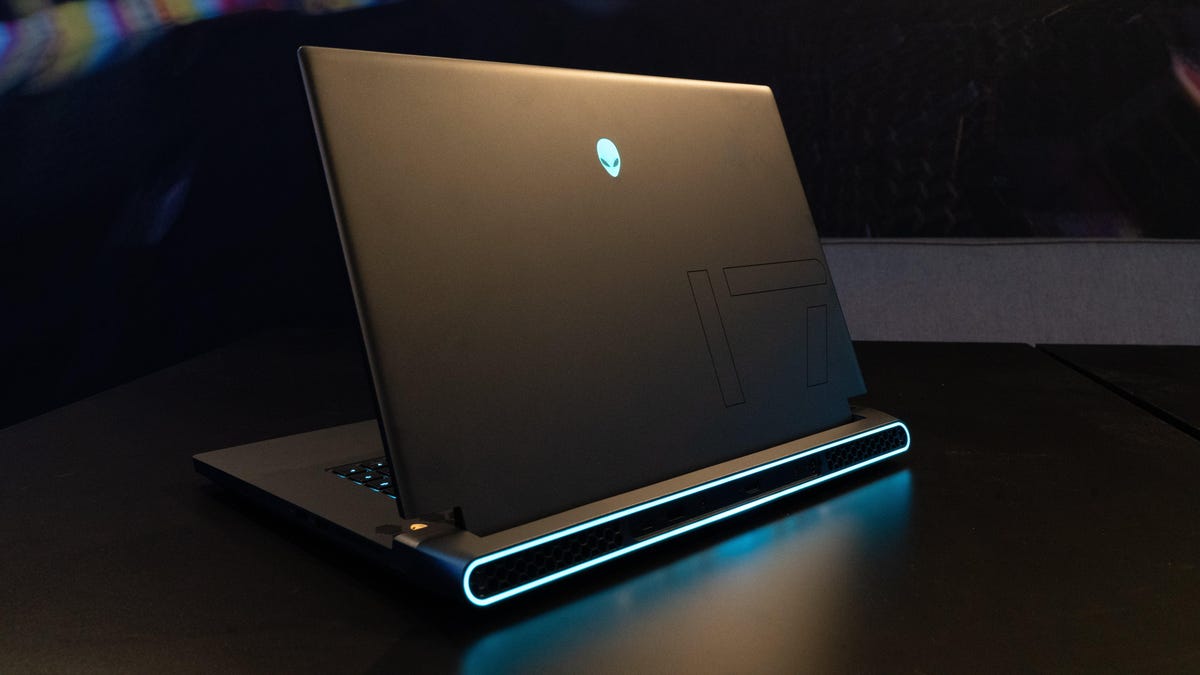
The premium Alienware m15 R7 and m17 R5 highlight four new Ryzen-powered systems.

Apple is offering its new firmware update for the MagSafe accessory that promises to give you faster charging for the compatible iPhone models.

System apps with native call-recording functionality remain unaffected.
The OnePlus Nord 2T India launch may take place soon as the moniker has been spotted on the TDRA certification. The OnePlus Nord 2T's camera details have also been leaked. Here are the expected specifications of the device.

The iPhone 16 is likely to be the first Apple device to skip the camera notch.

Garena Free Fire Max redeem codes are 12-digit codes that are region-specific and can be used by players to gain an edge over rivals in every round of the battle royale game.
We are still not sure that no-charger policy will be limited to Narzo 50A Prime or it will be extended to other Realme budget, mid-segment and premium phones